Project Planning Event
Choosing Type of Event
Before building the detailed phase plan, choose the event format that best fits team maturity, project complexity, and budget. The wrong format can slow alignment; the right format accelerates decisions and improves handoff quality.

In-person events usually create faster trust and clearer coordination for new teams and complex kickoffs. Virtual events usually lower cost and work well when teams already know how to collaborate, especially for mid-project planning updates.
| Factor | In Person | Virtual |
|---|---|---|
| Cost | Higher cost | Lower cost |
| Team familiarity | Better fit when team members do not know each other well | Better fit for teams with a history of working together |
| Project complexity | Better fit for complex projects, especially when kickoff begins in earnest | Better fit for simpler projects |
| Project phase | Strong fit at initial kickoff | Usually better fit for intermediate gates such as validation |
| Typical duration | Usually 2-3 days | Usually 2-3 hours per session, 2-3 sessions per week, for 6-10 sessions |
Virtual planning events are usually straightforward when only two of the three major time zones are involved (Americas, Europe, Eastern Asia/China). They are often impractical when attendees are spread across all three.
This can be relaxed when only one person in one region can travel to another region for the event window, or is willing to keep inconvenient hours during the kaizen to avoid travel. But when substantial groups are active in all three zones, in-person is often the only practical option.
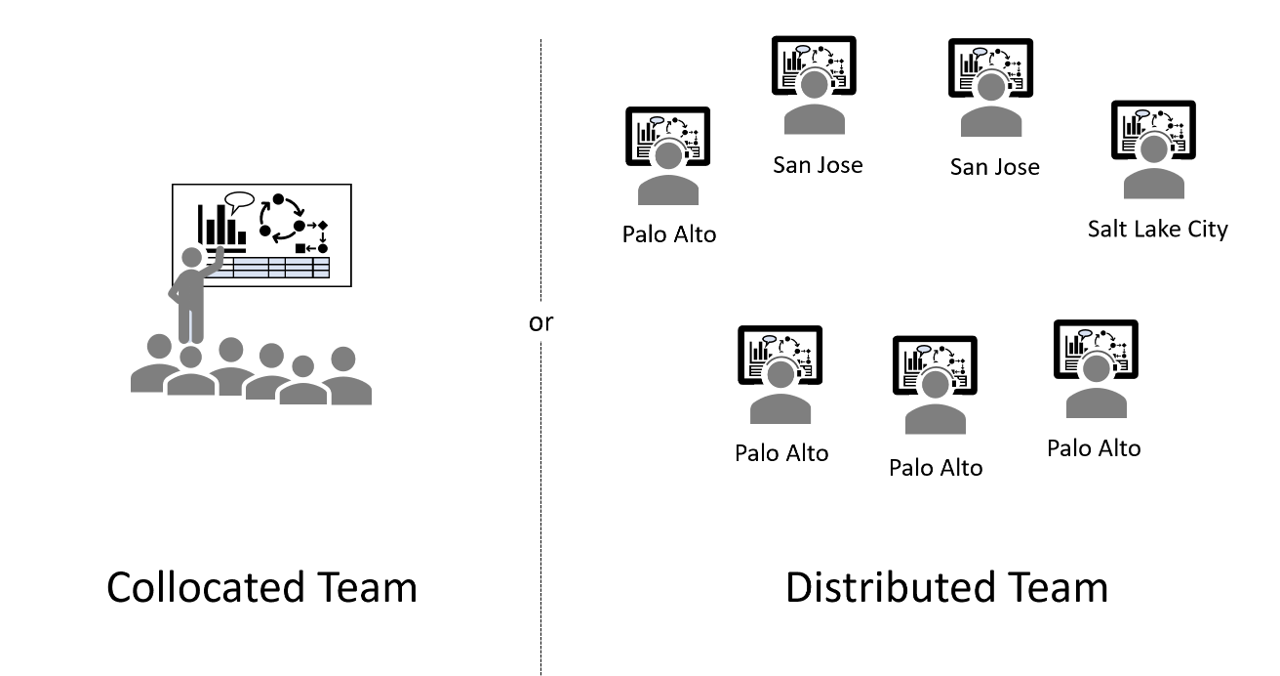
Figure: Pick one event format — fully in-person (collocated) or fully virtual (distributed). A mixed room-plus-speakerphone setup gives remote attendees second-class visibility and voice.
Align functional schedules
The planning event turns strategy into an executable phase plan. Cross-functional leaders align handoffs, sequencing, and timing so the team can see one integrated path to delivery before execution begins.
Step 1: Prework by each swim lane owner
Before the event, each swim lane owner builds a first-pass schedule as they understand it. This draft will be imperfect, but it is far better than starting the event with a blank wall. The most important thing is that each lane owner captures every task they are currently aware of. It is fine if dependencies do not yet align and if schedules do not interlink cleanly at this stage.
Step 2: Build one integrated swim lane schedule during the event
In the event, the team creates one integrated swim lane schedule for the full project. In person, this is usually done on a wall with butcher paper or large sticky posters where teams place and adjust notes from Step 1. In virtual sessions, teams can use an electronic whiteboard such as Microsoft Whiteboard, iObeya, Miro, Lucid, or even PowerPoint.

This is where the "horse trading" starts. Teams negotiate dependencies and timing until lanes align. Long tasks are often split to enable partial deliverables, such as providing an intermediate firmware build that lets hardware teams begin testing earlier. The room should sound like a bus terminal, with many conversations happening in parallel to close gaps and improve flow.
At the end, reserve 1-2 hours for a full walkthrough where each core team member presents their lane to the entire team. It can feel tedious, and people will be tempted to check email or step out. Do not allow that drift. Full attention here is critical so every team understands colleagues' needs and handoff commitments.
Step 3: Compress and frame options for leadership decisions
This bottom-up plan often produces a first date that misses business targets. When that happens, treat compression like a structured problem-solving exercise. Look for opportunities to run work in parallel instead of serially, break tasks into smaller chunks, and apply temporary resource blitzes or outside support where it makes sense.
The team's job is not to simply answer "yes, we can" or "no, we cannot." The team's job is to present viable options to hit the needed timeline and make the costs and tradeoffs explicit. Leadership decides whether those costs are acceptable.
As Stephen Spielberg is often quoted: "Your job is not to say yes or no. Your job is to say yes and how much. My job is to say yes or no."
Compress to meet business needs
Meeting organizational expectations
Delivery time is usually the most visible business need, but it is rarely the only one. Teams also need to protect launch feature set, expected margin, quality and reliability targets, regulatory and compliance requirements, customer or contract commitments, and available cash and staffing capacity. In many companies, strategic timing matters just as much as raw speed: hitting a market window or portfolio priority can be the difference between a strong launch and a missed opportunity.
Compression techniques
- Make serial tasks parallel where technical risk is acceptable.
- Break long tasks into shorter tasks to allow mid-task handoffs and earlier downstream work.
- Purchase ready-made solutions instead of custom development when fit is strong.
- Use partners to develop complex subassemblies or subprocesses.
- Add focused resources on critical-path work for a defined period.
- Stop or pause lower-priority initiatives to increase project focus and free capacity.
- Accelerate decision flow (faster approvals and escalation paths) so teams are not waiting for governance.
- Recheck the critical path after each change so compression effort stays focused on what moves the date.
Click here to see more about compression methods: Compression Techniques.
Isolate the next project phase
Plan the full project first, often 1-2 years, at the right level of granularity, usually weeks, not days. Then create a second, zoomed-in VPM for only the next phase, typically the next 3-5 months.
This phase-level schedule is the execution schedule. Redraw it at roughly 1-day granularity, and keep most tasks at 2 weeks or less so handoffs, blockers, and tradeoffs are visible early.
Choose the phase endpoint by value
The next gate is usually the best phase endpoint. If that gate is too far out, pick another high-value outcome such as first lab prototype, first integration build, or first customer test unit.
Break tasks that cross the boundary
When tasks cross the selected phase endpoint, split them into meaningful chunks with explicit partial deliverables. This allows the current phase to close cleanly and keeps the next phase realistic.
Replan at every phase transition (true-up)
At the end of each phase, expect facts to have changed. Some functions may slip, new requirements may appear, and older assumptions may be dropped. Run a focused planning true-up at each transition, usually as a smaller virtual event, and re-cut the succeeding phase from weekly view to daily view for the coming months.
Why this works
This approach gives teams both control and flexibility: stable direction at project level, fast adjustment at phase level, without chaos.
This approach is consistent with a rolling-wave planning context: "near term is planned in detail, while the work in the future is planned at a higher level" (Project Management Institute, PMI Lexicon of Project Management Terms, Version 5.0, January 2026, p. 27, "rolling wave planning").
Example
A 15-month product program is first mapped at weekly granularity. The team then isolates the next 4-month phase ending at "validation gate entry." Firmware tasks longer than 6 weeks are split into intermediate builds so hardware and test can start earlier. At phase close, the team runs a half-day virtual true-up, updates assumptions, and rebuilds the next phase at daily granularity before execution continues.
Consolidating hidden buffer at phase end
- Understanding hidden buffer
- How distributed vs. consolidated buffer
- Selecting the buffer ration
- The fever chart as a scoreboard
- Locked milestones
- Buffer and outside organizations
Set up regular stand-up meetings
- Selecting cadence
- Owner attendance requirements
- When to invite SMEs
- Open invitations for leaders
Plan preparation of succeeding phase
- Scheduling the "true up" of the next phase
- Launch planning (3-6 months before launch)